CamooZ
Save Webcam Settings. Restore Them Anytime.
CamooZ saves your webcam settings as profiles and brings back your perfect camera look for OBS, Zoom, Stream Deck and creator workflows.
BUILT FOR REAL CREATOR SETUPS
One Tool. Multiple Setups.
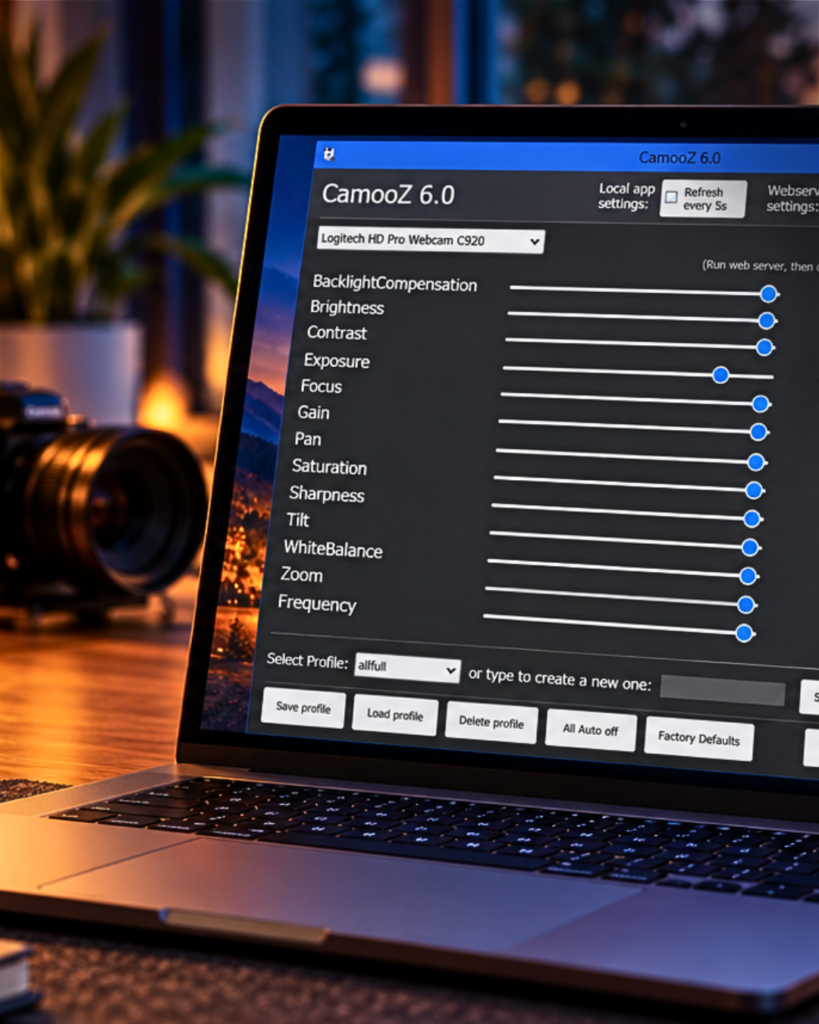
READY FOR EVERY WORKFLOW
CamooZ is often used with OBS, but it is not only an OBS tool. Use it for Zoom calls, Teams meetings, webinars, online teaching, video recordings, Stream Deck workflows and multi-camera setups.
Wherever your camera look needs to stay consistent, CamooZ helps you restore the right setup faster.
Try it first. Upgrade when you love it.
Free to try · Full version only
One-time purchase via PayPal (plus tax). Unlock unlimited camera profiles, hotkeys, autoload and Stream Deck control.
Trusted by creators worldwide
Proven since 2021
Figures from the official CamooZ page in the OBS forum (as of Nov 2026).
The problem
Why your webcam forgets everything
Windows only offers an old camera dialog that you cannot even open directly – only through another program like OBS. Your settings are not saved, so after a reboot your camera is back in an undefined state. And there is no way to keep different setups for different light or rooms. Read why webcam settings keep resetting.
CamooZ fixes exactly that: set your camera once, save it as a profile, load it again in one click.
Features
Everything your camera needs
Camera profiles
Save separate looks for daylight, evening, meetings, streaming or recording – and switch in seconds.
Fine tuning
More granular control than the Windows dialog: exposure, focus, white balance, zoom and every slider your camera offers.
Your order, your names
Sort and rename the sliders – in your language – so the most important ones are always on top.
Lock & undo
Lock settings you never want to change by accident. Made a mistake? Ctrl+Z brings it back.
Stream Deck plugin
Load profiles with your Elgato Stream Deck. The plugin is included and also available in the Stream Deck store.
Remote control
Hotkeys, command line, autoload at start and a built-in web server to control cameras on another PC.
Compare
Windows vs. CamooZ
| Feature | Windows dialog | CamooZ free | CamooZ full |
|---|---|---|---|
| Adjust camera settings | ✓ | ✓ | ✓ |
| Open directly, without OBS | ✕ | ✓ | ✓ |
| Sort, rename & lock sliders | ✕ | ✓ | ✓ |
| Undo with Ctrl+Z | ✕ | ✓ | ✓ |
| Save multiple profiles | ✕ | ✕ | ✓ |
| Autoload profile at start | ✕ | ✕ | ✓ |
| Hotkeys & command line | ✕ | ✕ | ✓ |
| Stream Deck & web control | ✕ | ✕ | ✓ |
| Price | – | Free | 4.99 USD |
Using Windows 11? See what the Windows 11 camera settings can and can’t do.
Made for you
Who uses CamooZ?
Online teachers
Same professional look in every lesson – whether you teach from the living room, the office or outside. Some teachers even load their profiles automatically when their class tools start.
Read the guide →Home office & video calls
Zoom, Teams or Google Meet: one profile for morning light, one for evening. No more fiddling before every call.
Read the guide →Streamers & creators
Switch looks live with your Stream Deck, control zoom presets and keep multi-camera setups consistent in OBS.
Read the guide →Quick start
Ready in 3 steps
Download
Get CamooZ for Windows for free and start it – no OBS needed.
Set your look
Adjust your camera until it looks perfect. Sort and lock the sliders you need.
Save & restore
Unlock the full version for 4.99 USD and save your look as a profile – load it anytime.
Guides & help
Popular webcam guides
Save webcam settings
How to keep your camera look in Windows 10 and 11.
Read →Best OBS webcam settings
Exposure, white balance and focus for a sharp stream.
Read →Webcam too dark?
7 easy fixes for dark or grainy video.
Read →Turn off autofocus
Stop focus pumping and flickering exposure.
Read →Look better on Zoom
9 simple tips for Zoom and Teams calls.
Read →Logitech not saving?
Causes and a simple fix for C920, C922 and Brio.
Read →As seen on YouTube
Reviewed by creators
CamooZ has been reviewed in English, German, Spanish, French, Italian and Russian.
FAQ
Frequently asked questions
Do I need OBS to use CamooZ?
No. CamooZ works on its own. It is popular with OBS users, but it also helps with Zoom, Teams, webinars, online teaching and recordings.
Which operating system does it run on?
CamooZ is a Windows tool.
Which webcams are supported?
CamooZ works with webcams that offer adjustable settings in Windows – many models without their own software benefit the most. It can even control an Insta360 Link via the Stream Deck plugin.
What is the difference between free and full?
The free version lets you fine-tune, sort, rename and lock your camera settings. The full version adds saved profiles and every way to load them: autoload, hotkeys, command line, Stream Deck and web control. Full comparison.
How much does the full version cost?
4.99 USD (plus tax), paid once via PayPal.
Will my settings survive a reboot?
Yes – that is exactly what CamooZ is for. Set one profile to autoload and your camera is ready every time you start.
I have two identical webcams. Can CamooZ tell them apart?
Give them unique names first with CamRename, then save one profile per camera. See our guide on multiple webcams in OBS.
Where does the money go?
All license fees go into the development of Falti’s other tools, most of which are free.
Webcam chaos ends here
Your perfect camera look. Every time.
Try CamooZ free today – upgrade to the full version for just 4.99 USD.
6 thoughts on "CamooZ – Save & Restore Webcam Settings for Windows"
Comments are closed.